Why I Replaced My Kindle With… Another Kindle

Nearly a decade ago, I bought my first Amazon e-reader. I’d always been a physical book kind of guy, but since I was planning to hit the road full-time later that year and couldn’t fit a bookcase in my carry-on, it was time to take the leap.
That Kindle Keyboard 3G served me well for eighteen months, up until the day I dropped it onto the deck of a yacht I was holidaying on in Turkey. It bounced once, twice, then sailed perfectly between the safety rails and into the harbor below.
Strangely enough, a saltwater enema was not what the doctor ordered for my electronics. Even after drying it out, the page still forlornly showing on the screen was the last it would ever display.
The replacement has lasted far longer. It’s still working fine, the shorter battery life and scuffed screen the only sign of years of (ab)use. It’s slow, though, big and kinda ugly by current tech standards. The free worldwide 3G web browsing, so important when I bought it, is now useless thanks to strict data limits, new web technologies, and cheap local SIM cards.
In a world of touch screens, navigating with a physical controller and buttons feels antiquated and takes forever. The text also now seems very dim and indistinct, especially compared to my phone, and I’d found myself using it less with each passing year as a result. Instead, I switched to the Kindle app, or just read stuff from around the web and ditched books altogether.
And Then…
Not long before Christmas, Amazon discounted the [Product unavailable] to under $100. The company had run that sale a few times before, and each time I’d ignored it. I really wasn’t sure I needed a new model.
How much difference would it really make? Since I was reading less anyway, would I get any use out of it? Didn’t the app do a good-enough job? Shouldn’t I just spend the hundred bucks on a plane ticket instead?
Eventually, after much cajoling from my other half, I gave in and clicked the button. On Christmas Eve, I unwrapped my new purchase, downloaded my reading library, and settled in on the sofa to finish The Year of Living Danishly that I’d started months earlier. It’s a good book, by the way. You should read it.
A few days later, having learned all I needed to know about hygge, Lego, and the burning of witches, I looked up and realized how much more satisfying it had been to read on the Paperwhite than with the app or my old device. A hundred bucks well spent? You bet.
Why Buy a Kindle Paperwhite?
The biggest difference, by far, is the built-in light. My previous Kindle didn’t have one, while the backlight on my phone is too bright to use in the dark. Even with the level turned down, the backlighting hurts my eyes after a while and messes with my sleep cycle.
On overnight flights and during my various Caminos de Santiago, I’d really noticed how much phones and tablets light up a darkened room or airplane cabin, disturbing anyone who’s trying to sleep. Not cool. In the end, I just gave up trying to read after the lights went out.
The Paperwhite projects light down onto the screen, illuminating the words rather than the surroundings. In a dark room, with the brightness set to around a quarter, I’ve found it easy to read for an hour or more without annoying anyone around me.
I use it in bed all the time, and on a couple of recent flights, and it makes a surprisingly big difference. It’s a dim glow, rather than an eye-piercing blast.
Even using that light, battery life is phenomenal. It helps that I keep the Wi-Fi turned off unless I’m downloading something, but even so, I’ve had to charge the Paperwhite exactly once in the two months I’ve owned it. That’s while working my way through four lengthy books, so it’s not like it’s just sat in my bag during that time either.
I get bored on long flights, so knowing I’ll be able to keep reading long after the rest of my devices are out of charge is a big relief. Especially when, as on my last flight, the “best” option on the in-flight entertainment is There’s Something About Mary. Seriously.
The touch-screen navigation is a vast improvement, especially being able to tap either side to turn the page. It’s still slower to scroll and refresh than a phone, but nowhere near as bad as on the Keyboard version.
The screen resolution has doubled between models, and it shows. Text is much crisper, and photos are no longer an unidentifiable blur. There are more, better fonts to choose from, and a wider range of zoom settings.
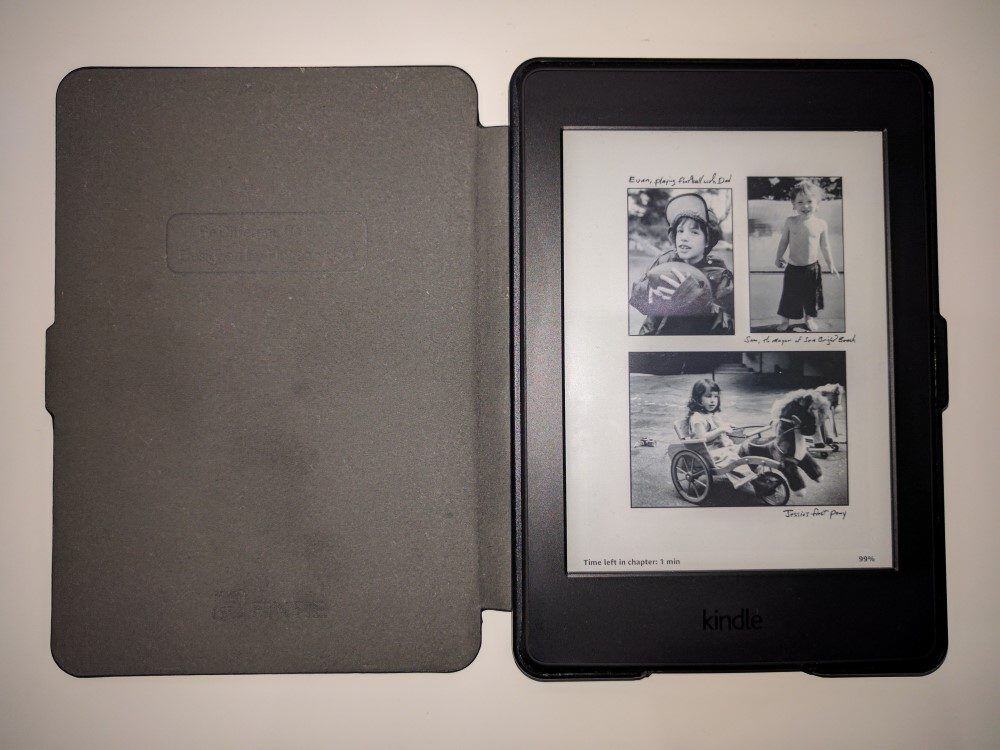
Being able to see how many minutes remain until the end of the chapter is a nice touch, helping me decide whether I’m going to keep reading or go to sleep, and having my Amazon and Goodreads wishlists available right on the home screen make it frighteningly easy to buy new books. Which is, of course, entirely the point.
Reading in direct sunlight on the Paperwhite is at least as good as on the earlier model, and incomparably better than squinting at a phone or tablet. Those matte e-ink screens just don’t reflect light in the same way. No screen glare = happier eyes.
Finally, even though the screen dimensions haven’t changed between models, the overall size and weight definitely have. Without that keyboard at the bottom, the Paperwhite is nearly an inch shorter, with a few millimeters shaved off the width and depth.
It’s also noticeably lighter when holding it in one hand. That’s something I do a lot more now — the smaller size makes it a more comfortable option, even with the addition of the cheap case I bought to protect it.
Get regular updates from the world of travel tech and remote work
News, reviews, recommendations and more, from here and around the web
So, despite resisting for years, buying [Product unavailable] turned out to be a good move. I’m reading a lot, because it’s easier and more enjoyable to do it. Buying books is simpler, and I can read them in a wider range of situations than any of my other gadgets.
For all practical purposes, I never need to care about finding a power socket for it. In a world where I have “charge anxiety” with every other damn gadget I travel with, that’s seriously refreshing.
It’s small, light, and fits in even the smallest of carry-on bags. Hell, it fits in my back pocket when I need it to. Even at regular price, it’s not going to break the bank. Having got it on special, it now feels like an absolute bargain, and I can see myself continuing to travel with it for years to come.
I knew things had changed a few days ago, when it came time to do my semi-regular deletion of unused apps on my phone.
This time around, the Kindle app was one of them.
[Product unavailable]Do you travel with a Kindle? Why or why not?
Main image via Perfecto Capucine


Kindle Paperwhite was my very first e-reader and I never go on a trip without it! Lately, audiobooks on Audible have been my latest preference–nice when you don’t want to strain your eyes or arms by holding a physical device.
My brother bought me a Paperwhite for my birthday 4 years ago, and it is still holding strong! I still gravitate toward physical books when I’m not traveling, but it has been great for when I’ve been on the road or sharing a room with someone. I love it for all the reasons you listed above, and having an e-reader has been great for those times I’ve stumbled upon amazing Kindle deals while browsing Amazon. I actually bought a Kindle Fire for Christmas a few years ago because it was on sale, but I never used it because my Paperwhite is still in such great condition — I eventually just gave it to my brother and called it a day. I will use my Paperwhite until it stops working, and then I’ll probably replace it with another. As someone who took a long time to give in to having an e-reader, it has been one of the greatest gifts I’ve received.
I probably bought 3 kindles and ended up selling them all… I still find myself loving to flip the pages of a physical book, but that’s not very practical for long-term travelers 😡
I’ve had a Paperwhite for many years and taken it everywhere. I wouldn’t, however, want to live without the Kindle app on my phone. When I’m home, I don’t like bringing my Kindle with me when going to the bank or a restaurant. It’s much more convenient being able to pull out my phone, fire up the app, and being able to read while waiting in line or for my meal to arrive. I love how it opens to the same page as I left off on my Paperwhite (at home I can leave the WiFi on all the time so it’s always in sync with my phone).
The Paperwhite is excellent and has served me well. I now use the Oasis. Buttons to turn pages, larger screen and most importantly the best lighting available. It makes a big difference.
Does anyone know if the new kindles can brouse and download books now that the 3G is no longer available.My old 3rd edition can off the edge WiFi but is very slow…..Jon k
Amazon switched from 3G to 4G on the cellular-enabled Kindles a while back, so if you have a recent model, the answer is probably yes. If you’re buying today, the only model with cellular capability is the Oasis, since the option was removed for the Paperwhite with the latest generation.
I did the walk from Seville to Santiago (1000 km) with 2 kindles in my pack. I carried the Paperwhite for my reading. A Kindle fire to do all my internet stuff… email, searching, booking, Skyping, etc. Why carry 2 Kindle? The Paperwhite has a far longer battery life than the Fire. For instance, it’s nice to have that battery on long transits (plane, train or bus) if you don’t have access to charging. Wayne
Hmm. As with others, you don’t mention that trying to download a library of books is pure grief. I broke my old Keyboard model last week (lots of years there) and was able to transfer most of my books relatively easily to a spare device I had (discarded by a family member). Thought, though, I should “upgrade” and went for the Paperwhite. Got it Monday 6/22 and have successfully downloaded less than a tenth of my library by 6/26. Did take time to read one book; it was an OK experience. (Not impressed by/used to the “controls.”)
Only things I like about Paperwhite are the higher resolution and the great built in light. (I’m guessing that even this water-resistant critter wouldn’t withstand a harbor swim.)
You might want to have a chat to Amazon about that — it really shouldn’t take anywhere near that long to download your library no matter how large it is, unless there’s a problem with the device, your internet connection, or Amazon’s servers.
The latest Paperwhite is rated to survive immersion in ‘two metres of fresh water for up to 60 minutes’ — it might survive a quick dip in the harbour if it wasn’t too deep, it could be retrieved quickly, and all the salt water was rinsed off immediately, but I wouldn’t put money on it!
I’ve always had kobos, my original kobo touch hasn’t lasted about 10 years or so. My new kobo clara was gotten 2018 Christmas and developed a crack in the casibg a few months back so had planned on get replacement but the store didn’t sell. I decided to try a kindle and straight away hated it, I didn’t like the book recommendations on the main screen, not having the bookcover as the sleep screen, not being able to delete items completely off the device so they wouldn’t show, not easily being able to go back to the beginning of a book and the bezels around the outside are a lot thicker.
The only thing I liked was the fact that it was a flat screen more like a tablet than a normal ereader.
I went straight back to my kobo and put in to return the kindle that same day.
My new kindle cannot find the virgin network. I bought it because my last kindle stopped finding the network several months ago. It looks like I will have to change from Virgin.
Another Kobo user here. I went through 3 iterations of Kindles, including the first 2 Paperwhites, before switching to a Kobo Clara HD. I am now using and LOVING a Libra H2O. A waterproof device with a 7-inch screen, the same size as the Kindle Oasis at not much more than half the price, it’s so much better value than the Paperwhite. I wish more people realised that when it comes to e-readers, there ARE viable, quality alternatives to Kindles.
I’ve read this kindle review, and can’t see how it can be better than my kobo Forma, or even my old nook. I’d hate to be bound to one supplier of ebook or one format.
You’re not strictly bound to one format on the Kindle, but if that’s your priority, you should indeed buy something else.
My wife and I are very happy using our Kindle Fires to read. She alternates between books and solitaire. I use mine also for news and Facebook. As a published author, I am a bit sheepish about using an eReader- but I notice that I haven’t cracked the hard copy books on my nightstand in over a month….
I was one of those people who always said I didn’t want an e-reader. I liked the tactile experience of flipping paper pages. Then I was given a Kindle as a Christmas present. I didn’t do anything with it for a couple of months. Then I decided to try it so I downloaded something and I haven’t looked back. Like a lot of you I turn my Wifi off unless I am downloading a book . I check out a lot of library books on my Kindle. By turning off my Wifi, not only does it prolong battery life but the book stays on my device till the next time I am online just in case I can’t read the book in less than two weeks.